What is schema markup, and does a wedding planner need it?
Schema markup, also called structured data, is a short block of code that visitors never see. It states facts about your business in a format search engines read: your name, what you do, where you work, how to reach you and where else you're listed. Google says it uses structured data "to understand the content of the page" (Google Search Central).
It isn't a ranking trick. Google says structured data "does not guarantee" any special display in results (Google's structured data policies). Our judgment: it's still worth one hour, because it removes guesswork about who you are and where you work, and you only set it up once.
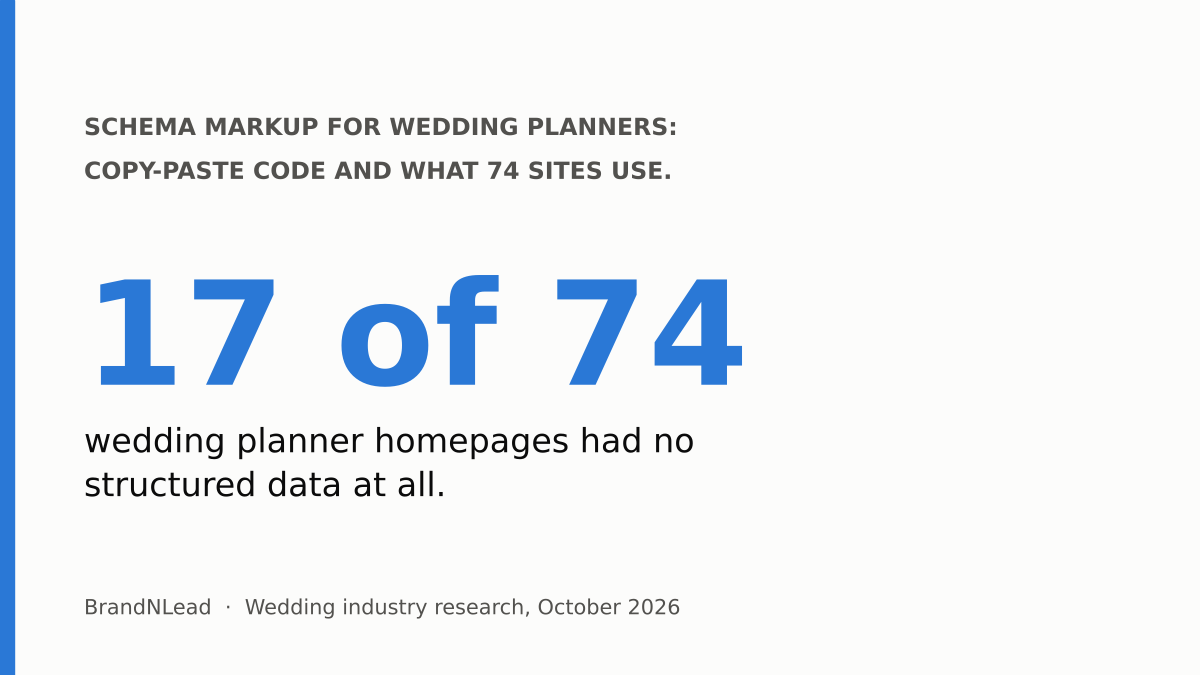
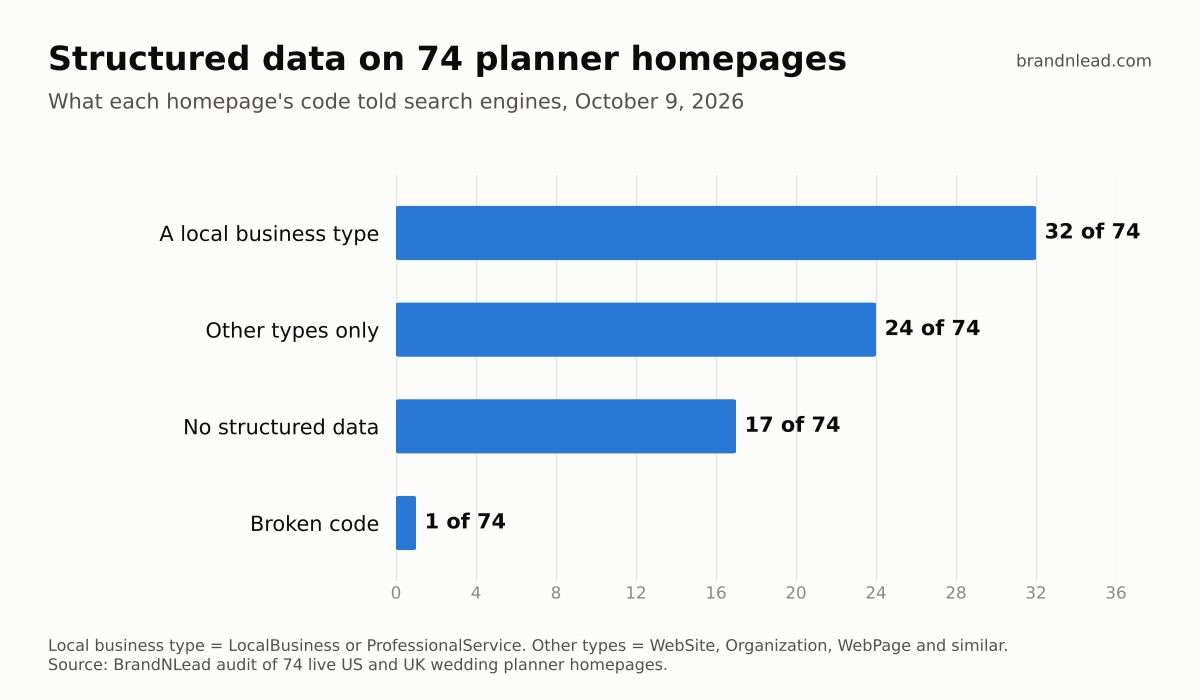
Many planners haven't done it. In our audit of 100 wedding planner websites, 17 of the 74 live homepages had no structured data at all, and 1 more had code that was broken.
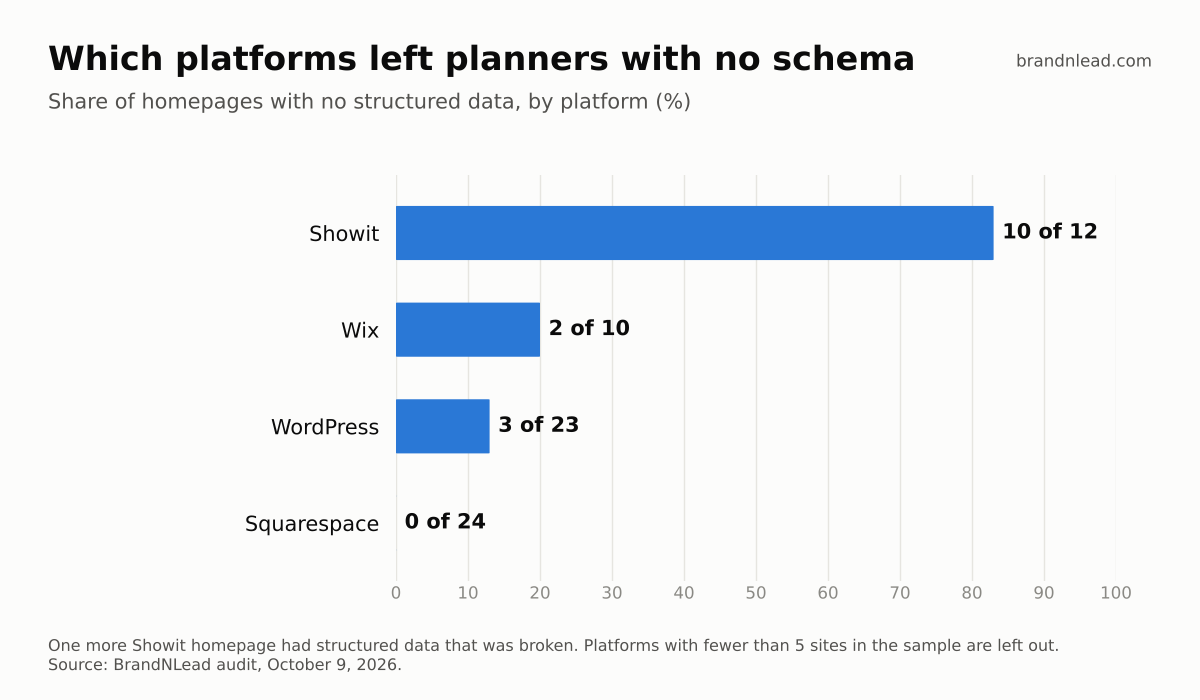
The website platform made the biggest difference. Squarespace adds structured data automatically, so all 24 Squarespace homepages had some. Showit doesn't, and 10 of 12 Showit homepages had none. Our posts on Showit and Squarespace cover each platform in detail.
Which schema type should a wedding planner use?
Use LocalBusiness in most cases. Schema.org, the shared vocabulary search engines use, has no type for wedding or event planners (schema.org), so the general LocalBusiness type fits best. Google's local business guide requires just two properties, name and address, and recommends others such as url, telephone and priceRange.
- LocalBusiness: for a planner with a base in a city or region, which is most planners. 32 of the 74 homepages we checked used a local business type.
- Organization: for a destination planner with no local base. Google's organization guide lists no required properties and recommends putting it on your homepage.
- Skip ProfessionalService for new code: 7 of the 74 homepages used it, but schema.org notes the general ProfessionalService type "was deprecated due to confusion with Service" (schema.org). LocalBusiness does the same job.
- Wedding venues: use EventVenue instead. Our wedding venue SEO guide covers it.
Copy-paste code: LocalBusiness for a wedding planner
Copy the block below and replace every value with your own. Only include facts that also appear on your website: Google's policies say structured data "must be a true representation of the page content" (Google). Delete any line you can't fill rather than guessing.
<script type="application/ld+json">
{
  "@context": "https://schema.org",
  "@type": "LocalBusiness",
  "@id": "https://www.example.com/#business",
  "name": "Your Business Name",
  "description": "Full-service wedding planner in Charleston, SC, planning weddings across the Lowcountry and beyond.",
  "url": "https://www.example.com/",
  "logo": "https://www.example.com/logo.png",
  "image": "https://www.example.com/images/real-wedding.jpg",
  "telephone": "+1-843-555-0123",
  "email": "hello@example.com",
  "priceRange": "From $5,000",
  "address": {
    "@type": "PostalAddress",
    "streetAddress": "123 Example Street",
    "addressLocality": "Charleston",
    "addressRegion": "SC",
    "postalCode": "29401",
    "addressCountry": "US"
  },
  "areaServed": ["Charleston, SC", "Kiawah Island, SC", "Savannah, GA"],
  "sameAs": [
    "https://www.instagram.com/yourhandle",
    "https://www.facebook.com/yourpage",
    "https://www.example-directory.com/your-listing"
  ]
}
</script>
What each part does:
- @id: a fixed ID for your business. Use your homepage address plus "#business".
- name and address: the two properties Google requires. Use your business name exactly as it appears on your website and your Google Business Profile.
- areaServed: the places you plan weddings. Schema.org allows it on Organization types, and LocalBusiness is one (schema.org).
- sameAs: links to your other official profiles, such as Instagram and directory listings. It ties those profiles to your website.
- priceRange: optional. Use the same starting price your website shows, or leave the line out.
What if you work from home and don't show your address?
Most planners are service-area businesses and don't publish a street address. Google's guide lists address as required, doesn't cover service-area businesses, and says to "include as many properties as possible" (Google). Our recommendation: include your town, region and postcode, leave out the street, and make sure the same town appears on your website.
<script type="application/ld+json">
{
  "@context": "https://schema.org",
  "@type": "LocalBusiness",
  "@id": "https://www.example.co.uk/#business",
  "name": "Your Business Name",
  "description": "Wedding planner based in Bristol, planning weddings across Bath, Somerset and the South West.",
  "url": "https://www.example.co.uk/",
  "logo": "https://www.example.co.uk/logo.png",
  "telephone": "+44 7700 900123",
  "email": "hello@example.co.uk",
  "address": {
    "@type": "PostalAddress",
    "addressLocality": "Bristol",
    "addressRegion": "England",
    "postalCode": "BS1",
    "addressCountry": "GB"
  },
  "areaServed": ["Bristol", "Bath", "Somerset", "Cotswolds"],
  "sameAs": [
    "https://www.instagram.com/yourhandle"
  ]
}
</script>
Never put an address in your markup that isn't on your website or your Google Business Profile. Our Google Business Profile guide explains how service-area businesses hide their address there.
Where do you paste the code on Showit, Squarespace, Wix and WordPress?
- Showit: select the page name (not the canvas) in the Design App, open the Advanced Settings tab in the right-hand panel, paste the code into Custom Head HTML, save, then publish (Showit help).
- Squarespace: check what's already there first, because Squarespace adds structured data for you; 17 of the 24 Squarespace homepages in our audit already described the business as a LocalBusiness. To add your own, open the page's settings, go to Advanced and use Page Header Code Injection. Code injection comes with the Core, Plus and Advanced plans and some older plans (Squarespace help).
- Wix: in the page's SEO settings, find Structured Data Markup, click Add New Markup and paste your code. Wix accepts JSON-LD only, up to five markups per page, each under 7,000 characters, on static pages (Wix help). If the field won't accept the script lines, paste only the part between them.
- WordPress: many SEO plugins already add Organization or WebSite markup. Test your homepage first, then add only what's missing, through your SEO plugin's settings or a plugin that adds code to your site's head.
How do you test it?
- Run Google's Rich Results Test. Paste your homepage address into the Rich Results Test; LocalBusiness is one of the types it checks.
- Fix anything marked as an error. Warnings about optional fields can wait.
- Check every type. The Schema Markup Validator reads all schema.org types, not only the ones Google shows in results.
- Re-test after any change to your phone number, address, prices or profiles, so the code always matches the page.
Which schema should a wedding planner skip?
- FAQ markup for extra space in Google: Google stopped showing FAQ rich results in Search from May 7, 2026 (Google Search Central). Keep writing FAQs for couples; just don't expect the markup to earn extra space. Only 1 of the 74 planner homepages we checked had FAQ markup anyway.
- Star ratings for your own reviews: Google says a business that controls the reviews about itself is "ineligible for star review feature" on pages with LocalBusiness or Organization markup (Google). Put your effort into Google reviews instead.
- Anything that isn't true or isn't on the page: cities you don't serve, prices you don't charge, awards you didn't win. Google can take away a page's eligibility for special results over misleading markup (Google).
Does schema markup help with ChatGPT and AI search?
Nobody outside those companies can say exactly how each AI tool uses structured data, and we won't pretend otherwise. What we can say: when we asked ChatGPT and Gemini to recommend planners, 31 of 40 answers linked to planners' own websites (our AI test). So the facts on your site matter. Structured data states those facts in a format machines read. In our view that makes it cheap insurance, not a shortcut.
What do we use on brandnlead.com?
Our homepage carries Organization markup with sameAs links to our Clutch, GoodFirms and Crunchbase profiles, plus alternateName entries for the ways people mishear our name, such as "Brand and Lead". It passed the Schema Markup Validator with 0 errors when we added it on October 4, 2026. It's the same idea as the code above: make sure search engines connect every mention of your business to your website.
Schema markup checklist for wedding planners
- Test your homepage in the Rich Results Test to see what's already there.
- Pick LocalBusiness, or Organization if you have no local base.
- Copy the code above and replace every value.
- Paste it into your homepage's head code and publish.
- Re-test and fix any errors.
- Update it whenever your contact details, prices or profiles change.
Our SEO checklist for wedding planners puts this step in order with the rest. If you'd rather have it done for you, structured data is part of our SEO for wedding planners.
How did we collect this data?
- Sample: 100 US (70) and UK (30) wedding planner websites found through Google searches; 74 homepages were live and checkable on October 9, 2026.
- Method: we read the structured data (JSON-LD) on each homepage, listed the schema types it declared, and identified each site's platform from its code.
- Limits: homepages only. We didn't check inner pages, and we didn't measure whether structured data changed rankings. Individual sites are not named.