
How do wedding planners set up a Google Business Profile?
Claim your free profile at business.google.com, choose Wedding planner as your main category, hide your home address if couples don't visit you there, set a service area within about two hours' drive, write a plain description of what you do and where, add real photos, then send your review link to recent couples. That takes about an hour, plus however long Google takes to verify you.
It's worth the hour because almost nobody in the industry is doing the joined-up version. In our audit of wedding planner websites, only 3 of 74 homepages linked to their Google Maps listing. And when we asked AI assistants to recommend planners, 2 of 20 Gemini answers were built straight from Google Maps results.
Why does a Google Business Profile matter for a wedding planner?
A Google Business Profile is the free listing that appears in Google Maps and in the box of local businesses on a Google search. When a couple searches "wedding planner near me" or "wedding planner in Charleston", those listings often show before the ordinary website results.
Google says it ranks these local results on three things: relevance (how well your profile matches the search), distance (how far you are from the searcher) and prominence (how well-known your business is, including reviews). It also says there's no way to pay for a better local ranking (Google Business Profile Help).
It also feeds AI answers. In our test of 40 AI answers about wedding planners, two Gemini answers, one for Chicago and one for Edinburgh, were built around Google Maps pins rather than website links. That's a small sample, but it's a sign the profile is now one more place AI assistants look.
The 60-minute setup, step by step
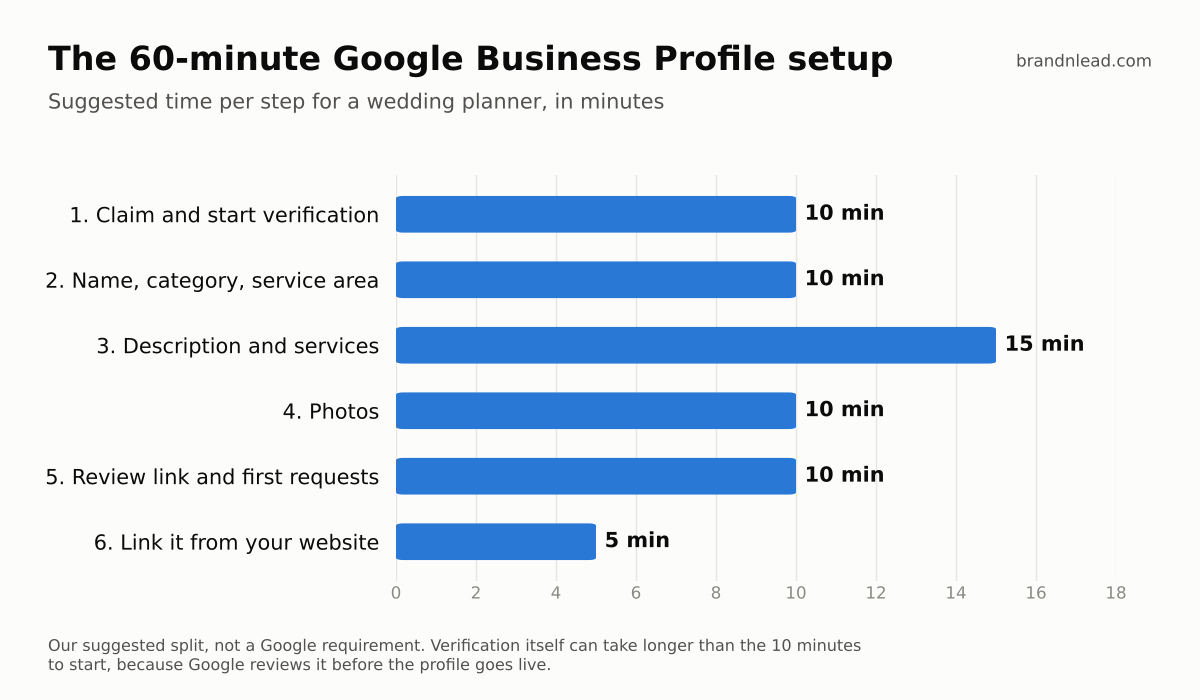
1. Claim your profile and start verification (10 minutes)
Go to business.google.com and search for your business name. If a profile already exists, claim it; if not, create one. Google will ask you to verify that you run the business. The method varies, and some take days, so start this first.
2. Get the name, category and service area right (10 minutes)
- Name: use your real business name exactly as it appears on your website and signage. Don't add keywords like "Best Luxury Wedding Planner Austin". Google's guidelines say unnecessary information in the name isn't permitted (Google's profile guidelines), and keyword-stuffed names risk suspension.
- Category: choose Wedding planner as your primary category. Google says to use as few categories as possible to describe your core business, so add a second one only if it's a real service, such as Event planner.
- Address: if couples don't meet you at your address, for example if you work from home, hide it and set up as a service-area business. Google's guidelines say service-area businesses should hide their address.
- Service area: list the real cities or regions you serve. Google says it shouldn't extend more than about two hours' drive from your base, so a destination planner can't list a whole country; describe destination work in your description instead.
3. Write the description and add your services (15 minutes)
You have up to 750 characters. Say who you are, what you plan, where, and for whom, in plain sentences. For example:
"[Business name] is a wedding planning studio in [city] offering full planning, partial planning and wedding-day coordination for [type of couples or weddings]. We plan weddings across [region] and [destinations, if any]. Packages start at [price], and you can see real weddings and pricing on our website."
Then add each service you offer, such as full planning, partial planning and day-of coordination, with a one-line description and a starting price if you publish one.
4. Add real photos (10 minutes)
Upload your logo, a cover photo, a clear photo of you or your team, and 5 to 10 photos from real weddings you planned, with the photographer's permission and credit. No stock images. Couples hire a person, so show the person.
5. Get your review link and send the first requests (10 minutes)
Copy your review link from the profile (look for the option to ask for reviews) and send it to couples from the last year, one personal message each. Google says more reviews and positive ratings can help local ranking, and that replying to reviews shows you value feedback (Google Business Profile Help).
Follow the rules here, because breaking them can get reviews removed. Google's policy bans reviews that are paid for or posted because of an incentive, and bans selectively asking only happy customers for reviews (Google's fake engagement policy). So no discounts or gifts for reviews, and ask every recent couple, not just the ones you know loved it.
6. Link the profile from your website (5 minutes)
Add a link to your Google Maps listing in your website's footer or contact page, and make sure your business name, phone and service area match on both. If your site has structured data, the code that describes your business to search engines, add the profile's Maps link there too. We cover how to check structured data in our Showit SEO test.
What should you avoid on your Google Business Profile?
- Keywords or city names added to your business name unless they're part of your legal or trading name.
- A virtual office or mailing address. Google's guidelines say a mailing-only address isn't eligible.
- Paid, swapped or filtered reviews, including asking friends or vendors to review you.
- Several profiles for one business, for example one per city you serve.
- Stock photos that don't show your real work.
How long until your profile shows up in Google Maps?
Once verified, the profile can appear in Maps, but where it ranks depends on relevance, distance and prominence, and nobody can promise a position. Planners who serve a whole region will mostly show up for couples searching near their base. Reviews build over months, so treat this as a one-hour setup plus a habit: ask every couple for a review after their wedding.
Your website still has to turn that visit into an inquiry; see how to get more inquiries from your wedding planner website. If you'd rather have your profile, website and search setup done for you, see our SEO for wedding planners.
Where do these numbers come from?
- Website audit: 100 US and UK wedding planner websites found through Google searches; 74 homepages were live and checkable on October 9, 2026. 3 of the 74 linked to a Google Maps listing.
- AI test: 40 answers from ChatGPT and Gemini (20 each, signed out) to two couple-style prompts across 10 US and UK cities, run on October 15, 2026. 2 of the 20 Gemini answers were built around Google Maps results.
- Rules and ranking factors: quoted from Google's own Business Profile guidelines, local ranking help page and fake engagement policy, checked October 15, 2026. We didn't measure Maps rankings.