How do you get more inquiries from your wedding planner website?
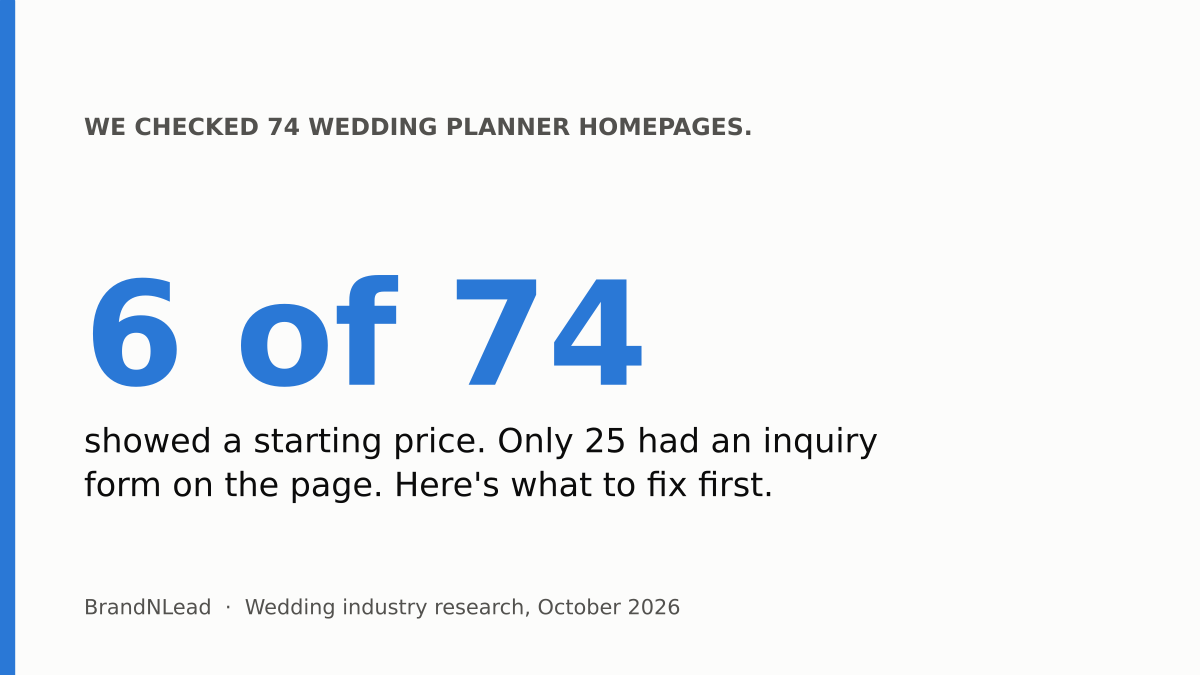
Make the next step obvious on every page, answer the questions couples have before they reach out (what you do, where, and roughly what it costs), make the site load fast on a phone, and reply quickly from one place. Most planner sites miss at least two of these: in our audit of 74 planner homepages, only 25 had an inquiry form on the page and only 6 showed any starting price.
We checked 100 US and UK wedding planner websites on October 9, 2026, and fully audited the 74 working homepages. No site is named here. Below is what we found and the fixes, in the order we'd make them.
What did we find on 74 wedding planner homepages?
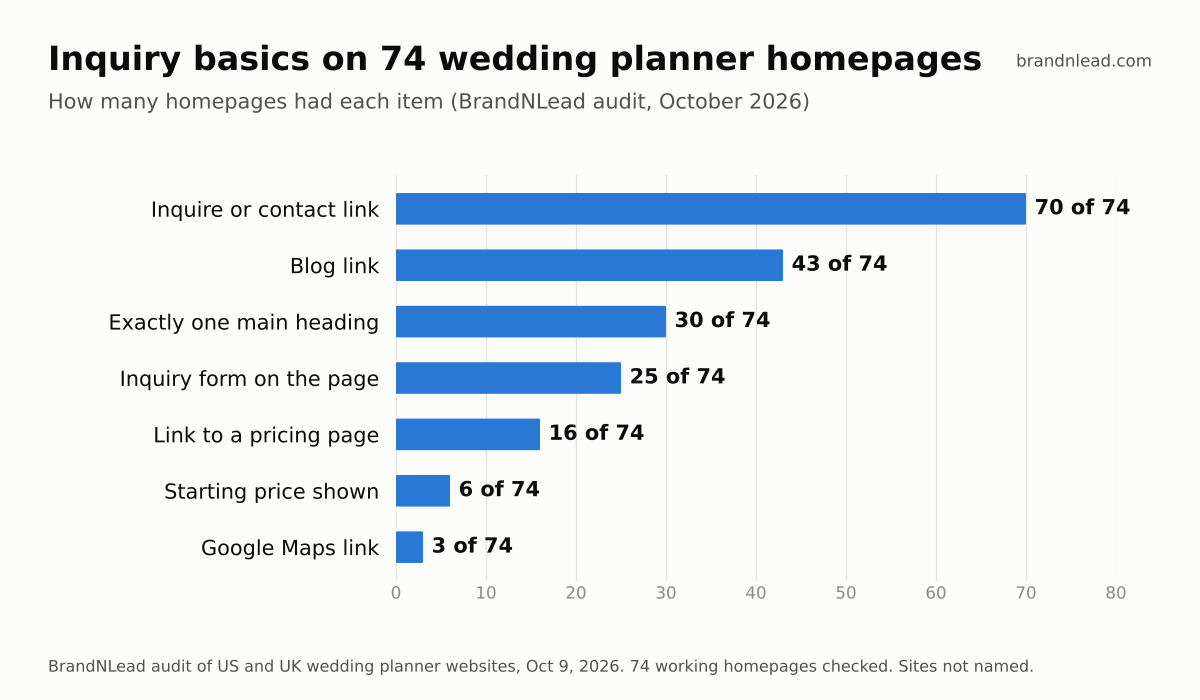
- Almost everyone has an inquire link: 70 of 74. Having a way to inquire isn't the problem.
- Few make it easy: 25 had an inquiry form on the homepage itself; the rest send couples to another page first.
- Almost no one mentions price: 16 linked to a pricing page and 6 showed a starting price or typical budget on the homepage.
- Most are slow on phones: of the 73 we could measure, the median wait for the main image was 9.7 seconds, and none loaded within Google's 2.5-second "good" line.
- Many don't say what they are: 17 had no main heading (the H1, the page's headline in the code) and 27 had more than one, which blurs what the page is about.
1. Where should the inquiry form go?
On your homepage and at the end of every service page, not only on a Contact page. A couple who has just read your full-planning page is at their most interested; every extra click is a chance to leave. Keep a "Check your date" or "Inquire" button in the header on every page as well.
Ask only what you need to qualify and reply: names, email, wedding date, city or venue, guest count, a budget range and how they heard about you. Every extra field is one more reason to stop. You can ask the rest on your discovery call.
2. Should a wedding planner show prices on their website?
Yes, at least a starting point. Only 6 of the 74 homepages we checked showed any price, so a starting price makes you stand out, and it filters out couples who would never book you before they take up a call slot.
Some planners worry a number scares people off. That is a fair concern if inquiries are scarce and you want every conversation. Our view: if most of your inquiries are already outside your range, a starting price or a line like "most of our couples invest $X to $Y in full planning" saves you hours each week. If you get very few inquiries, test it for a season and compare.
3. Does website speed affect inquiries?
It affects whether people stay long enough to inquire. Of the 73 planner homepages we measured on a simulated phone, 70 took more than 4 seconds to show their main image, which Google rates as poor. The usual causes are oversized hero photos, autoplay video at the top of the page and too many fonts. We compared speed by platform in Showit vs Squarespace vs WordPress for wedding planners.
Quick test: open pagespeed.web.dev, enter your homepage and look at Largest Contentful Paint on the mobile tab. Over 4 seconds means your first fix is image sizes, before any redesign.
4. Does your homepage say what you do and where?
Your main heading and first sentence should name your service and your area in plain words, such as "Full-service wedding planner in Charleston, SC." Couples skim, and search engines and AI tools read that heading to decide what the page is about. A poetic tagline can sit underneath it, not instead of it.
5. How fast should you reply to a wedding inquiry?
As fast as you realistically can, ideally the same day, from one inbox you actually watch. Inquiries rarely arrive in one place: in HoneyBook's 2026 study of 455 US wedding venue owners, inquiries came in by email (27.2%), personal text messages (26.7%), Instagram DMs (12.6%), business texting apps (11%) and phone calls (4.2%) (HoneyBook Venue Focus Study). That's venue data, but planners face the same scatter.
Route your website form to the email you check most, set an auto-reply that confirms receipt and says when you'll respond, and once a month send yourself a test inquiry. Forms break silently when a plugin or setting changes.
6. Can couples find you before they reach your website?
Only 3 of the 74 homepages linked to a Google Maps listing. A complete Google Business Profile with your real service area, photos and reviews helps couples who search "wedding planner near me" and feeds Google's map answers. AI tools matter too: we tested what ChatGPT and Gemini recommend in how to get recommended by ChatGPT as a wedding planner.
Wedding planner website inquiry checklist
- An inquiry form on the homepage and at the end of each service page.
- An "Inquire" or "Check your date" button in the header on every page.
- Seven fields or fewer on the form.
- A starting price or typical budget range on your services or pricing page.
- Main image loads in under 4 seconds on mobile (check at pagespeed.web.dev).
- One main heading on the homepage that names your service and area.
- Form submissions arrive in the inbox you check most, with an auto-reply.
- A test inquiry sent once a month.
- A complete Google Business Profile linked from your site.
If you'd rather have this built for you, our website design for wedding planners service covers every item on this list.
How did we collect this data?
- Sample: 100 wedding planner websites (70 US, 30 UK) found through Google searches for planners in their cities, checked October 9, 2026. 74 working homepages were fully audited; the rest were unreachable, parked, private or no longer a planner.
- Checks: each homepage was reviewed for inquiry links, an on-page form, pricing, main headings, a blog link and a Google Maps link. Speed came from one Google PageSpeed Insights mobile run (73 measured).
- Limits: homepages only, checked once. We didn't measure how many inquiries each site gets, so the fixes above are our recommendations based on what's missing, not a measured before and after.
Full results: we audited 100 wedding planner websites.