Showit, Squarespace or WordPress: which is best for a wedding planner?
Squarespace if you want the simplest setup with a blog included, Showit if design control matters most, and self-hosted WordPress if you plan to publish a lot and want to own everything. The platform matters less than how the site is built: in our audit, the most popular platform among planners, Squarespace, also had the slowest sites.
We checked 74 working wedding planner homepages in the US and UK on October 9, 2026, recorded which platform each one runs on, and measured how fast 73 of them loaded on a phone. Here is what real planner sites use, how fast they are, and what each platform costs today.
What website platform do most wedding planners use?
Squarespace and WordPress, by a wide margin. Of the 74 homepages, 24 ran on Squarespace, 23 on WordPress, 12 on Showit and 10 on Wix. The remaining 5 used Webflow or another platform.
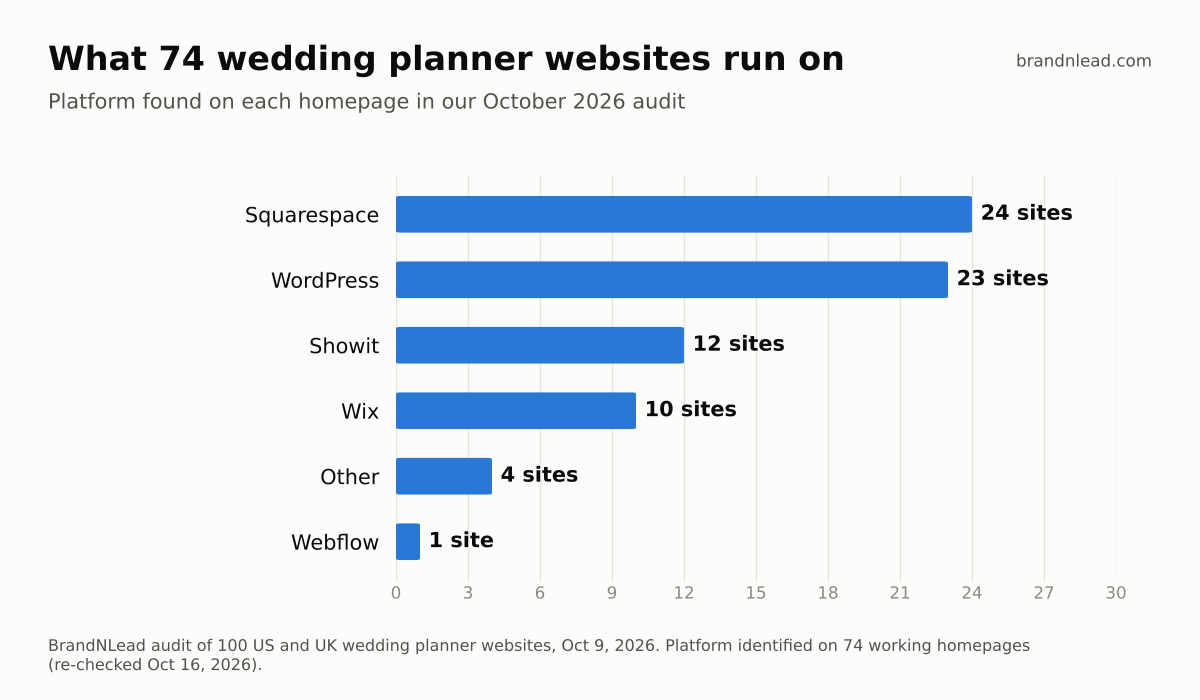
Showit gets most of the attention in wedding-industry design circles, but in our sample it ran fewer than one in five planner sites. Nearly every top-ranking "Showit vs Squarespace" article we found was written by a designer who sells templates or earns affiliate commission on one of the platforms, so take any verdict, including this one, as a starting point and check it against your own needs.
Which platform is fastest for a wedding planner website?
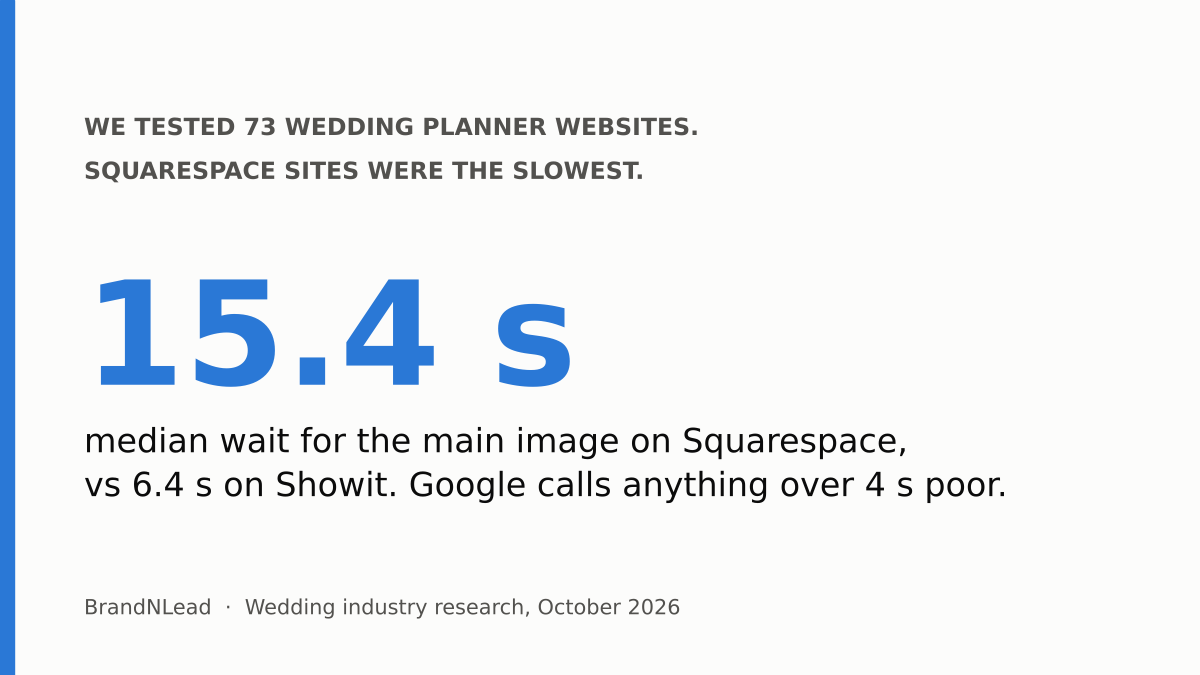
In our sample, Showit and Wix sites loaded fastest and Squarespace sites slowest. We measured Largest Contentful Paint, the time until the biggest thing on the screen (usually your hero photo) appears, using Google's PageSpeed Insights mobile test. Google rates 2.5 seconds or less as good and anything over 4 seconds as poor.
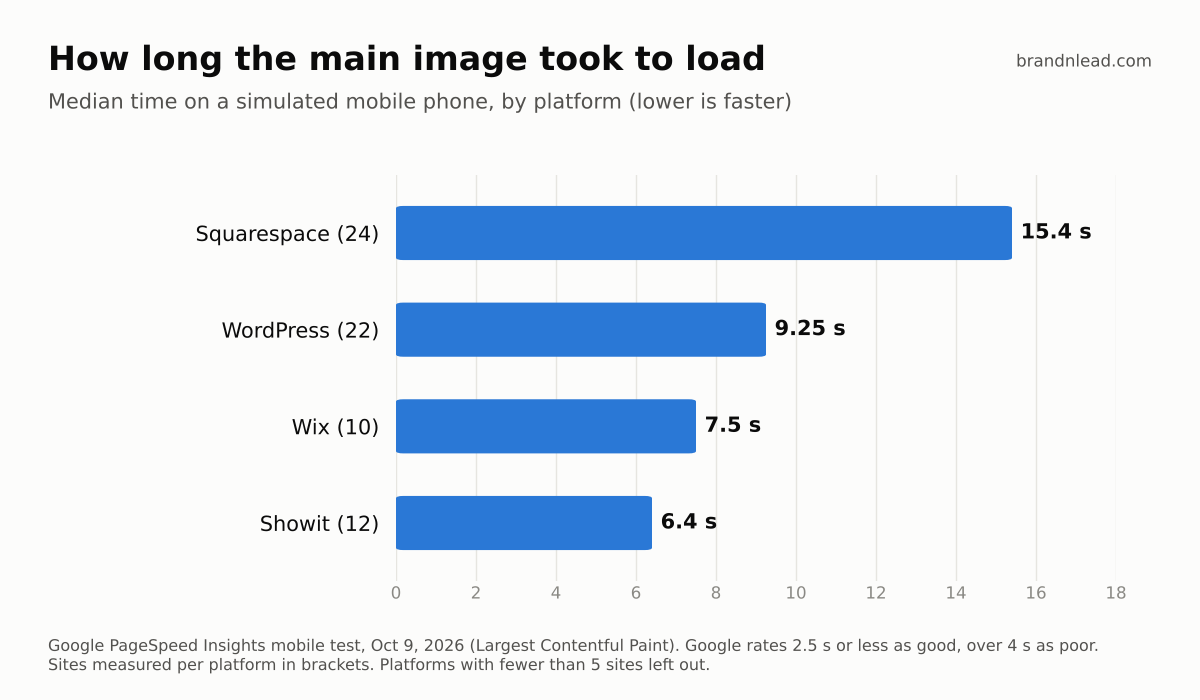
- Squarespace (24 sites): median 15.4 seconds; 20 of 24 took longer than 10 seconds; median PageSpeed score 48.5 out of 100.
- WordPress (22 sites): median 9.25 seconds; 10 took longer than 10 seconds; 2 of the only 3 sites under 4 seconds in the whole sample were WordPress. Median score 54.
- Wix (10 sites): median 7.5 seconds; median score 67.5.
- Showit (12 sites): median 6.4 seconds; only 1 took longer than 10 seconds; median score 65.5.
Read this carefully. These are small samples, measured once, and none of the 73 sites hit Google's "good" line, on any platform. Speed depends mostly on how a site is built: the size of the hero image, video backgrounds, and how many fonts and scripts load. A well-built Squarespace site can be fast and a careless Showit site can be slow. What the data does tell you is that slow, heavy planner sites are the norm, so whichever platform you pick, check your own speed.
How much does Showit, Squarespace or WordPress cost?
All prices below were checked on each company's own pricing page on October 15, 2026, in US dollars per month.
- Showit: $27 billed monthly or $22 billed annually without a blog. Adding a blog costs $34 monthly or $27 annually (Basic Starter Blog, up to 10,000 blog visits a month), or $49 monthly or $39 annually (Advanced Blog, up to 25,000 visits). A domain is not included.
- Squarespace: Basic $25 monthly or $19 annually; Core $39 or $29; Plus $65 or $49; Advanced $139 or $99. Blogging is included on every plan, and annual plans include a free domain for the first year.
- WordPress (self-hosted): the software is free; you pay for hosting, a theme and any premium plugins. Hosting ranges from budget shared plans to managed hosting around $25 to $30 a month, and you or your designer handle updates and security.
Those are platform fees only. Design is the bigger cost: see our breakdown of what wedding planner websites cost in 2026, from templates to fully custom builds.
Is Showit bad for SEO?
No. Showit pages can rank, and Showit's blog runs on WordPress, which handles blog SEO well. The real SEO trade-off is effort: on Showit you design every page visually, so it's easy to end up with text inside images, missing headings or duplicate page titles. Those are build problems, and they happen on every platform. In our audit, 17 of 74 planner homepages had no main heading at all, across all platforms.
Which platform should you choose?
Our recommendation, based on the data above and the sites we build:
- Choose Squarespace if you'll update the site yourself, want blogging included, and value simplicity over pixel-perfect control. Keep hero images small and avoid autoplay video at the top of the page.
- Choose Showit if your brand depends on a distinctive look and you're happy to pay extra for a blog. Get a designer who checks headings and page titles, not only visuals.
- Choose self-hosted WordPress if you plan to publish often, want full control and plugins, and have someone to handle updates.
- Don't switch platforms just for SEO. A move risks broken links and lost rankings unless every old address redirects to its new page. Fix headings, page titles, image sizes and service pages on the platform you already have first.
If you want a planner website built for speed and inquiries on any of these platforms, see our website design for wedding planners service.
How did we collect this data?
- Sample: 100 wedding planner websites (70 US, 30 UK) found through Google searches for planners in their cities, audited October 9, 2026. 26 were unreachable, parked, private, placeholders or no longer a planner, leaving 74 working homepages with an identified platform.
- Speed: one Google PageSpeed Insights mobile run per homepage; 73 of the 74 gave a measurement.
- Platform: identified from each site's code and hosting signals, then re-checked in a browser on October 16, 2026.
- Limits: homepages only, one test per site, small per-platform samples. Individual sites are not named.
Full audit results: we audited 100 wedding planner websites.