Is Squarespace bad for SEO?
Not for the basics. In our test of 24 wedding planner homepages built on Squarespace, every one had structured data, 22 of 24 had a meta description, and the median Lighthouse SEO score (Google's automated check for search basics) was 92 out of 100.
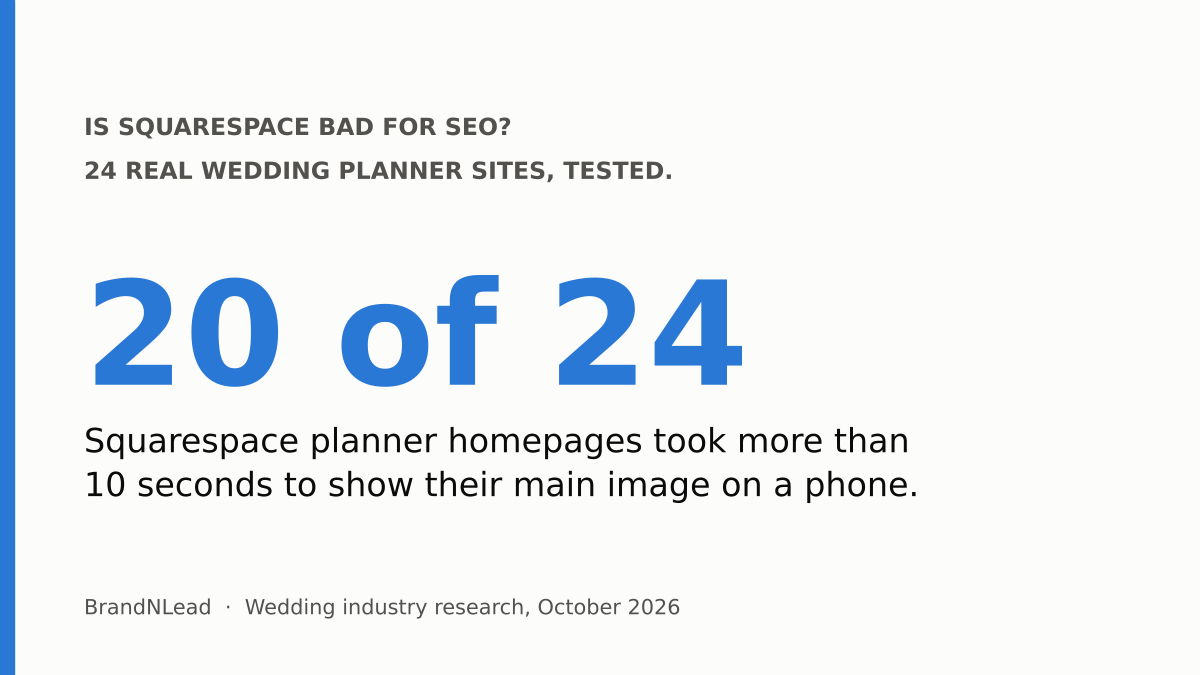
Speed is where Squarespace sites struggled. The median homepage took 15.4 seconds to show its main image on a phone, the slowest of any major platform we tested, and 20 of the 24 took more than 10 seconds. None got under Google's 4-second "poor" line. That's fixable, mostly by changing images, without leaving Squarespace.
What did we test?
These results come from our audit of 100 US and UK wedding planner websites, checked on October 9, 2026. Of the 74 homepages that were live and checkable, 24 were built on Squarespace, the most of any platform. For each, we ran Google's PageSpeed Insights mobile test and checked the homepage code for a meta description, heading tags and structured data.
What does Squarespace get right for SEO?
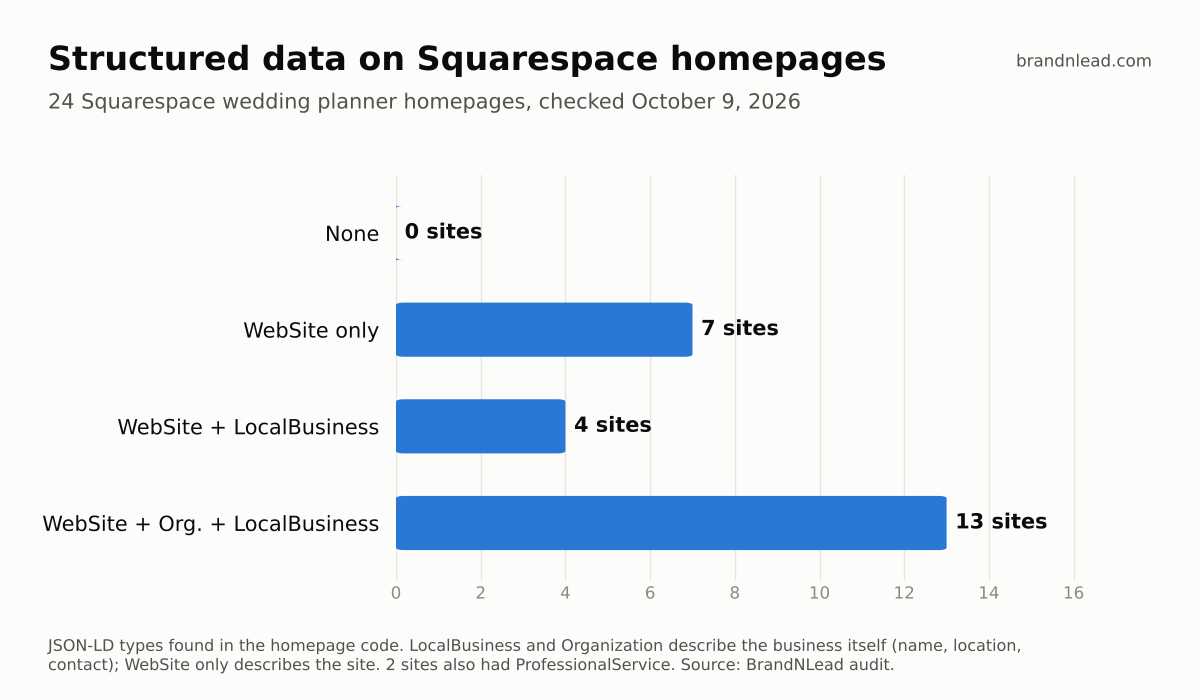
- Structured data on every site. All 24 homepages had structured data (code that tells search engines facts about your business in a standard format). 17 of 24 described the business itself as a LocalBusiness, with details such as name and location; the other 7 only described the website. By comparison, only 1 of 12 Showit homepages had working structured data.
- Meta descriptions. 22 of 24 had one, the short page summary Google sometimes shows under your link.
- Solid basic SEO scores. 11 of 24 scored a perfect 100 on Lighthouse SEO and the lowest was 85. Lighthouse checks basics like meta descriptions, link text and crawlability; it doesn't measure content or rankings.
Why are Squarespace planner sites so slow?
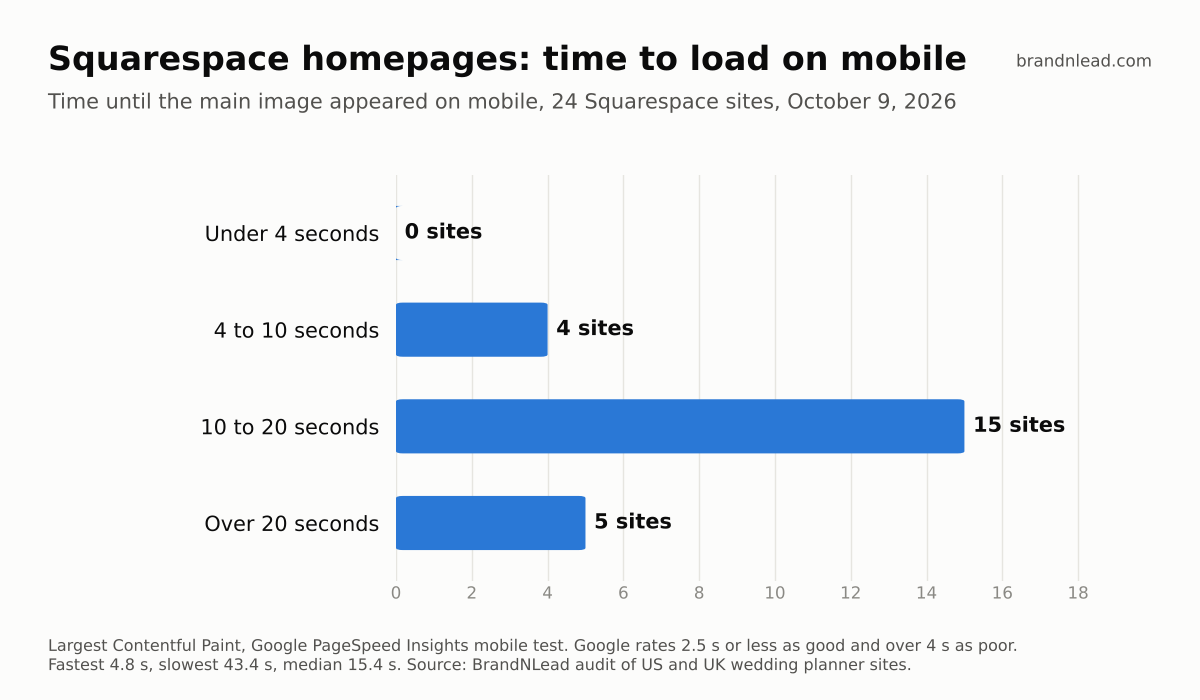
We measured Largest Contentful Paint (LCP): the time until the biggest thing on the screen, usually your hero photo, finishes loading. Google rates 2.5 seconds or less as good and over 4 seconds as poor (web.dev). On Squarespace planner homepages, the fastest took 4.8 seconds and the slowest 43.4. The median PageSpeed performance score was 48.5 out of 100.
We didn't diagnose each site individually, so the causes below are the usual suspects on image-heavy Squarespace sites rather than measured findings:
- Huge photo uploads. Images straight from a photographer's gallery, often several megabytes each.
- Video banners and slideshows at the top. They load before anything else and delay the first image a couple sees.
- Long homepages. Galleries, testimonials, Instagram feeds and press logos all stacked on one page.
- Extra code. Chat widgets, booking embeds, tracking pixels and custom fonts added through code injection.
Do Squarespace headings hurt SEO?
Not directly. 15 of 24 Squarespace homepages used more than one H1 (the top-level heading tag), 6 had exactly one and 3 had none. That's usually because the Heading 1 text style is used for several section titles. Google says there's no ideal number of headings and the order doesn't matter for search (SEO Starter Guide), so this isn't a penalty. One clear Heading 1 per page that says what you do and where is still the cleaner choice.
How do you fix SEO on a Squarespace site?
In order of impact, these are the fixes we'd make first:
- Test your homepage. Go to pagespeed.web.dev, open the mobile tab and note the Largest Contentful Paint. Re-test after each change.
- Resize photos before you upload them. Squarespace designer Paige Brunton recommends about 1,500 pixels wide and under 500 KB per image (her image size guide). Start with the hero image, then every image above the fold.
- Replace a video banner or slideshow with one strong photo. Move video lower on the page.
- Shorten the homepage. Keep a few chosen photos and link to the full gallery, reviews and press pages.
- Remove code you don't need. Check code injection for old pixels, widgets and font embeds.
- Use Heading 1 once per page. Make section titles Heading 2 or Heading 3.
- Write a unique SEO title and description for every page, in each page's settings under the SEO tab (SEOSpace's Squarespace checklist shows where). Include what you do and where, such as "Wedding planner in Austin, Texas".
- Check your structured data. Paste your homepage into Google's Rich Results Test. If it only shows WebSite, make sure your business name, address and contact details are complete in Squarespace, or add a LocalBusiness block yourself.
Should you leave Squarespace for SEO?
No, not for SEO alone. The basics Google checks were in good shape on most of the Squarespace sites we tested, and structured data was better than on any other platform. The weak spot was speed, and speed mostly comes from what's on the page, not the platform itself. Rebuilding on a new platform costs time and money and resets the work you've done; resizing images costs an afternoon. Our Showit vs Squarespace vs WordPress comparison covers when switching does make sense, and our Showit test shows what that platform gets wrong instead.
Does a slow site stop you ranking?
Page experience, including speed, is one of many signals Google uses, and relevance to the search matters far more. A slow homepage mostly costs you the couples who give up before your photos appear. That's why we'd fix speed before spending money on more traffic.
Want help? We do SEO for wedding planners, and we design faster websites for wedding planners.
How did we collect this data?
- Sample: 100 wedding planner websites in the US (70) and UK (30), found through Google searches. 74 homepages were live and checkable on October 9, 2026; 24 were on Squarespace.
- Tests: one PageSpeed Insights mobile run per homepage (performance score, SEO score and Largest Contentful Paint), plus a check of the homepage code for meta description, H1 tags and JSON-LD structured data.
- Limits: homepages only, one test each, and one platform sample of 24. We didn't test inner pages or blogs, measure rankings or diagnose the cause of each slow page. Individual sites are not named.