What are the most common wedding website mistakes?
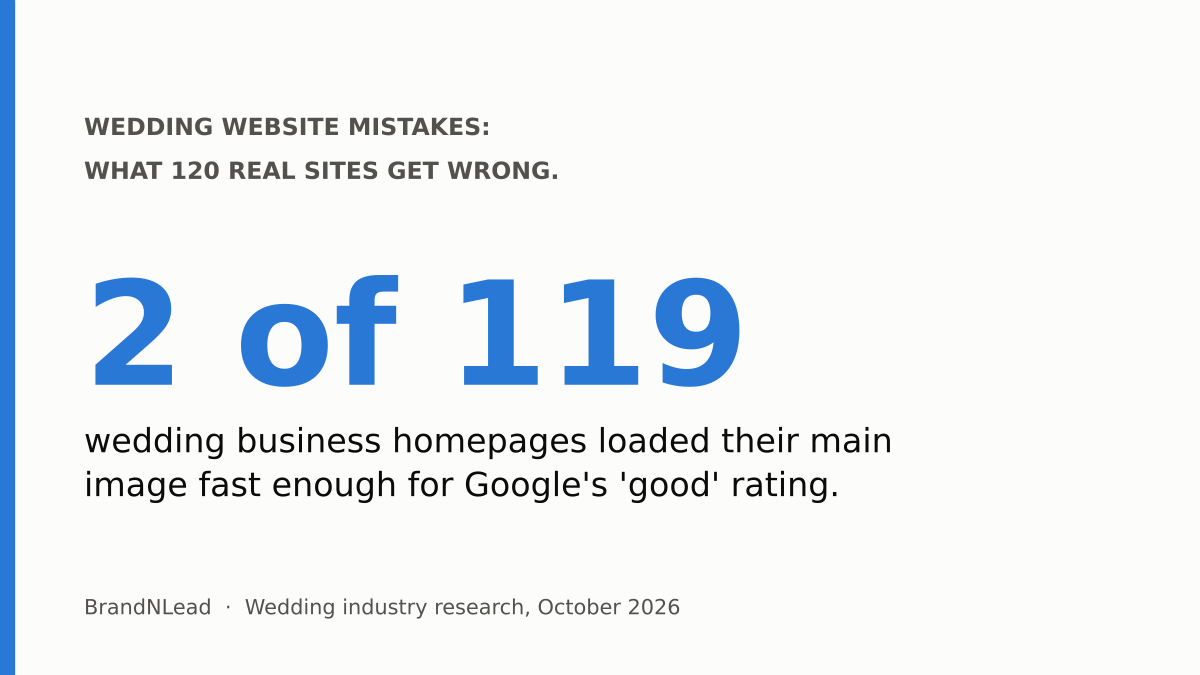
A slow main photo on phones, no inquiry form on the homepage, no price anywhere, and no link to the business's Google Maps listing. Those were the four most common problems when we checked 120 real wedding business homepages (74 wedding planners plus 46 venues and photographers) in October 2026. Only 2 of the 119 we could speed-test loaded their main image fast enough for Google's "good" rating.
None of these needs a new website. Most take an afternoon to fix. Here are the ten mistakes we found, how common each was, and the fix.
1. Is your main photo too slow on a phone?
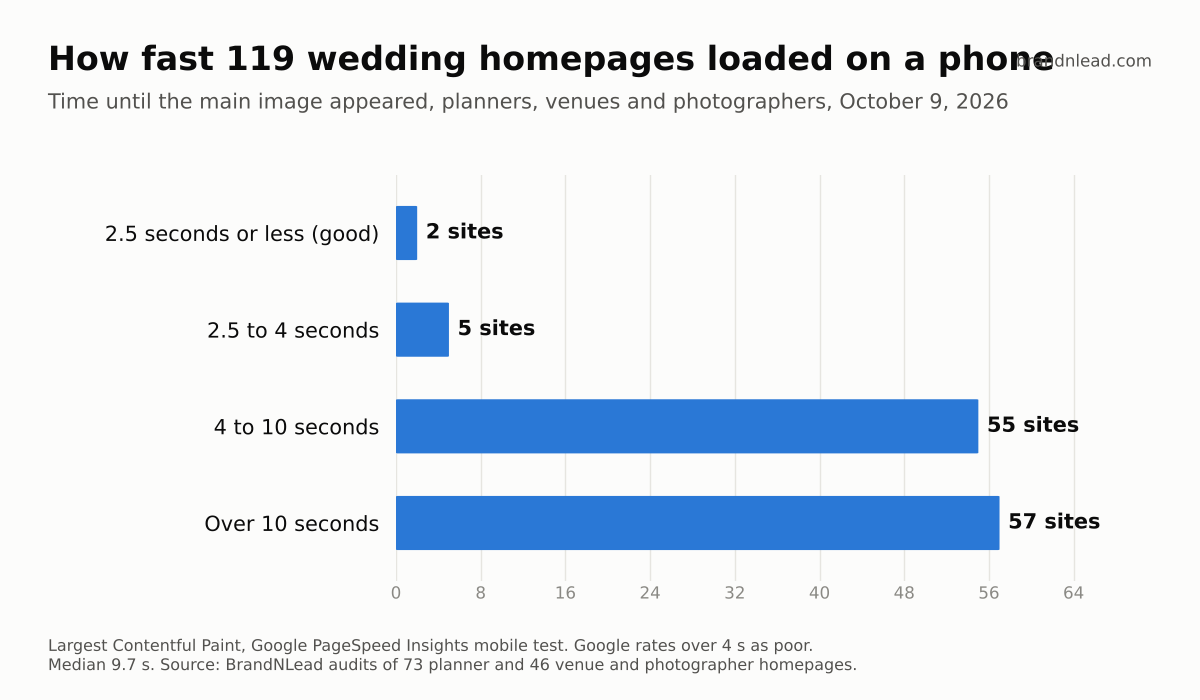
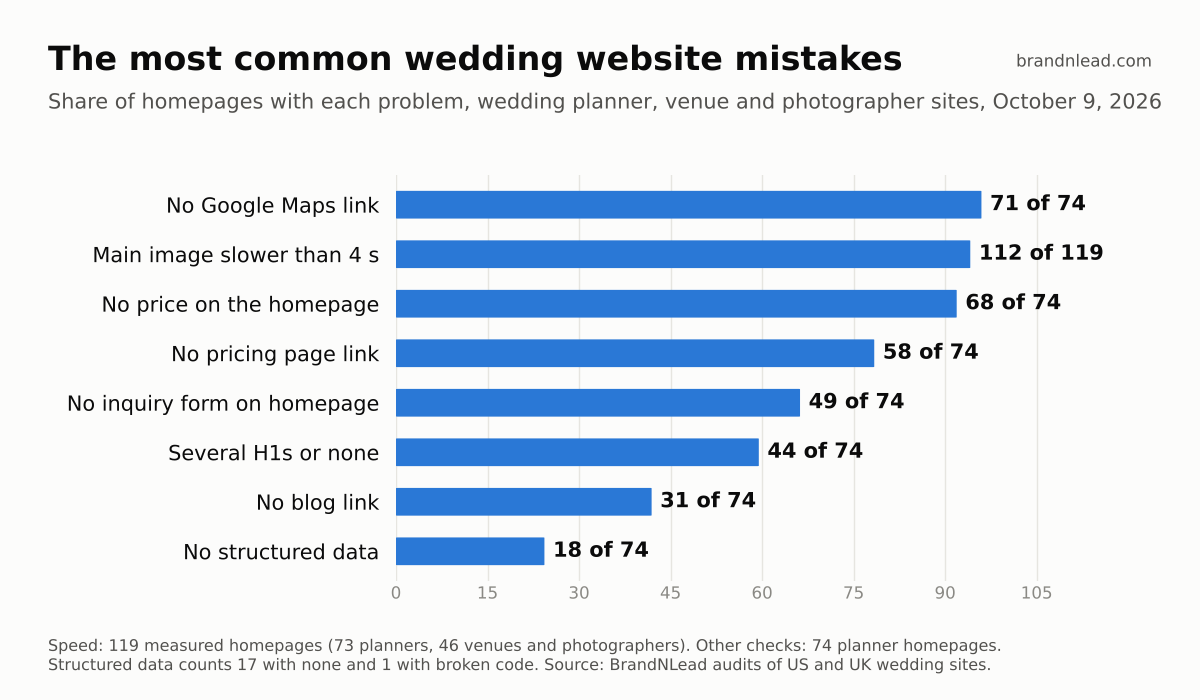
For most sites, yes. 112 of 119 homepages took longer than 4 seconds to show their main image on a phone, which Google rates as poor, and 57 took more than 10 seconds (what Google measures). The median was 9.7 seconds. Fix: export your hero photo at the width it's shown, as a JPEG or WebP of a few hundred kilobytes, and replace sliders or video banners at the top with one photo. Full results are in our venue and photographer speed test.
2. Is there an inquiry form on your homepage?
Only 25 of 74 planner homepages had a form on the page itself. Almost all, 70 of 74, did link to an inquiry page, so couples could get there, but each extra click is another chance for a couple to drift off. Fix: put a short form, or a clear inquiry button that opens one, near the top and again at the bottom of your homepage. We cover what to ask in how to get more inquiries from your website.
3. Do couples have to guess your price?
68 of 74 planner homepages showed no price or typical budget, and 58 didn't link to a pricing page either. Couples who can't tell whether you're in their range may not ask at all. Fix: add a starting price or a line like "most of our full-planning couples invest $X to $Y" to your services or pricing page, and link it from the homepage.
4. Can couples find you on Google Maps from your site?
Only 3 of 74 planner homepages linked to their Google Maps listing. Fix: set up or claim your free Google Business Profile, then link it from your footer or contact page so couples, Google and AI assistants can connect the two. Our Google Business Profile setup takes about an hour.
5. Does your homepage say what you do and where?
17 of 74 planner homepages had no H1, the main heading tag that tells search engines what the page is about, and 27 had several. Google says there's no ideal number of headings and their order doesn't matter for search (SEO Starter Guide), so this isn't a penalty. The real mistake is a homepage whose main line is a tagline like "Love, beautifully planned" that doesn't say what you do or where. Fix: make your main heading and first sentence plain: "Wedding planner in Charleston, South Carolina".
6. Are you missing a meta description?
22 of 119 homepages had no meta description, the one- or two-sentence summary Google sometimes shows under your link. Without one, Google picks text from your page, which may be a menu or a cookie notice. Fix: write a unique description for each important page, about 150 characters, saying what you do, where and for whom.
7. Does your site describe your business to search engines?
18 of 74 planner homepages had no working structured data: 17 had none and 1 had code that was broken. Structured data is a small block of code that states your business name, location, contact details and services in a format search engines read directly. Showit sites were most likely to be missing it. Fix: add a LocalBusiness block and check it with Google's Rich Results Test; we show how in our Showit SEO test.
8. Is your blog hidden?
31 of 74 planner homepages had no link to a blog. If you blog about real weddings and venues, those posts are often what couples find first on Google. Fix: link your blog from the main menu or homepage, and make each post about one specific wedding, venue or question.
9. Is your website still working?
Some of the businesses in our sample didn't have a working site at all. Of the 100 planner websites we started with, 6 were parked, for sale, redirecting to a spam site, password-protected or showing a hosting company's default page. A photographer's site showed a suspended hosting account. Fix: check your own site on your phone once a month, and set your domain and hosting to renew automatically.
10. Are you relying on directory profiles alone?
Directories matter, but your own site matters more to AI assistants. When we asked ChatGPT and Gemini to recommend wedding planners, 31 of 40 answers linked planners' own websites, while only 3 relied on directory pages alone (our AI test). Fix: keep your directory profiles current, but make sure your own site clearly states what you do, where and your starting price, because that's what these tools read.
Which mistake should you fix first?
Speed and the inquiry path, because they affect every couple who visits. Then pricing, then Google Maps and your Business Profile, then the search basics (headings, meta descriptions, structured data). If you'd rather have it done for you, we build websites for wedding planners with all ten covered, and our full audit of 100 planner sites has the rest of the data.
How did we collect this data?
- Planner audit: 100 US (70) and UK (30) wedding planner websites found through Google searches. 74 homepages were live and checkable on October 9, 2026, and 73 could be speed-tested. Each was checked for an inquiry link and form, pricing, headings, meta description, structured data, blog link and Google Maps link.
- Venue and photographer test: 50 sites, mostly in US wedding markets; 46 were speed-tested on October 9, 2026 (23 venues, 23 photographers) and checked for a meta description.
- AI test: 40 signed-out answers from ChatGPT and Gemini across 10 US and UK cities, October 15, 2026.
- Limits: homepages only, one PageSpeed Insights mobile run each, and small samples. We didn't measure rankings or bookings. Individual sites are not named.