How do you do image SEO on a wedding website?
Give every meaningful photo a one-sentence alt text that says what's in it, name the file before you upload it, and keep the file small. Alt text is the written description of an image in your page's code; screen readers read it aloud and Google uses it to understand the photo. Leave alt text empty only on images that are pure decoration.
Google's own image guide calls alt text the most important attribute for image information, recommends short but descriptive file names such as my-new-black-kitten.jpg over IMG00023.JPG, and warns against stuffing alt text with keywords (Google Search Central).
Wedding websites are mostly photos, so we checked how planners handle this. Between October 16 and 18, 2026 we opened 72 live US and UK wedding planner homepages from our audit in a browser and read every image tag.
How many wedding planner website images have alt text?
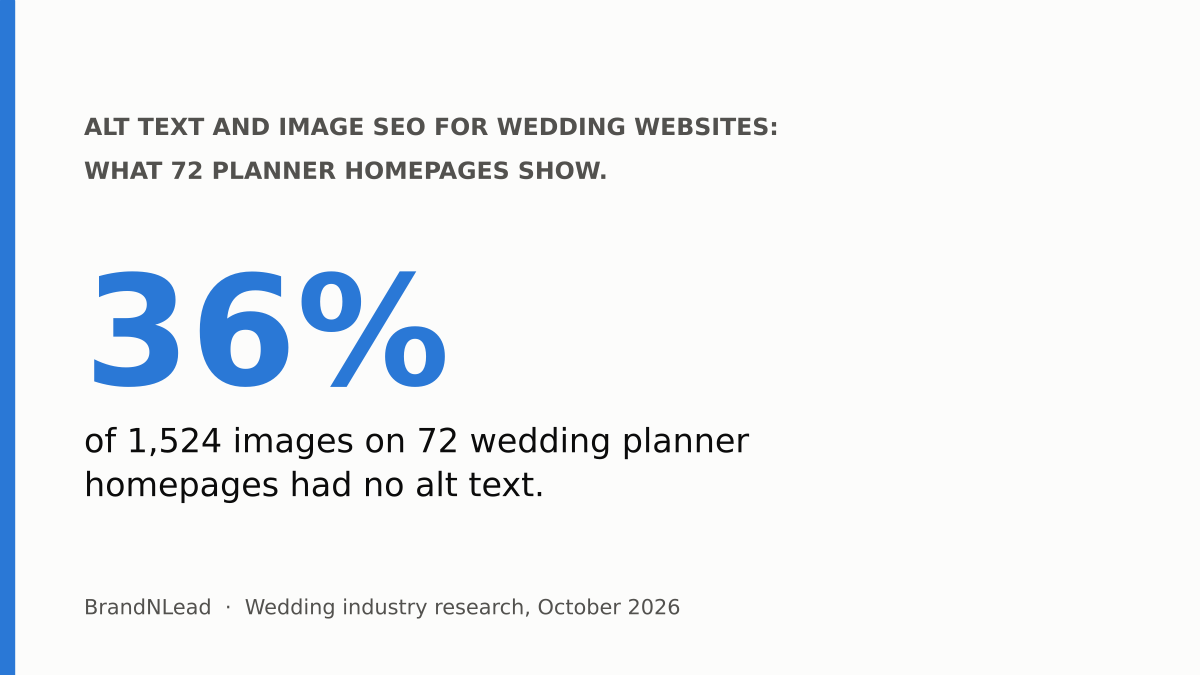
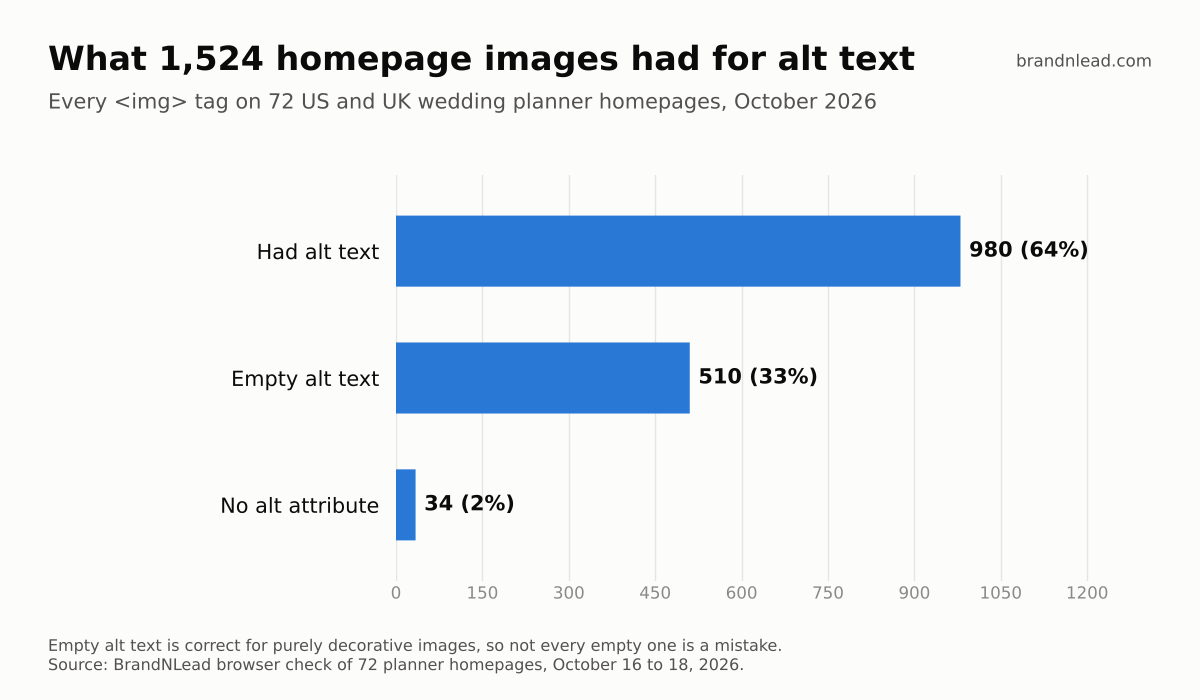
About two in three. The 72 homepages had 1,524 image tags between them. 980 had alt text, 510 had an empty alt text and 34 had no alt attribute at all, so 544 images (36%) told Google and screen readers nothing.
- 13 of the 70 homepages with images had no alt text on any of them. Only 10 had alt text on every image.
- 27 of 70 left half or more of their images without alt text.
- 14 of 70 had at least one image with no alt attribute at all, the version that accessibility checkers flag as an error.
- At least 19 of 70 served photos with camera or placeholder file names, such as IMG_7221.JPG, DSC07722.jpg, a screenshot named by date and time, Untitled design (11).png and unnamed.png.
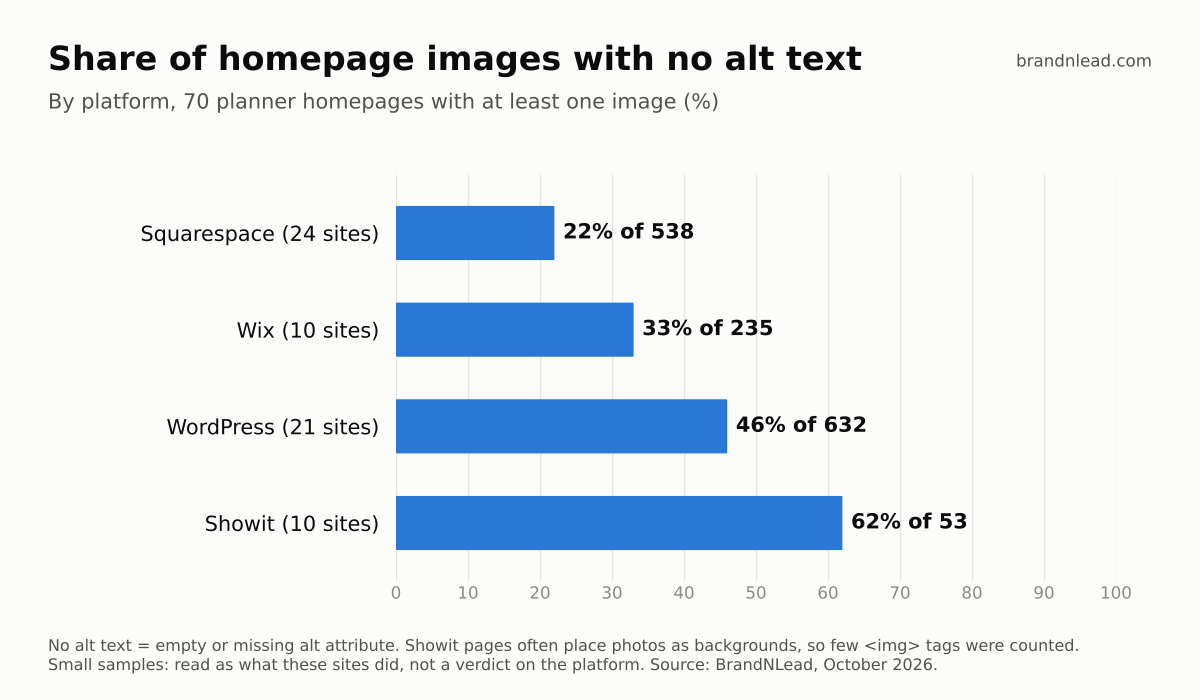
By platform, Squarespace homepages left the smallest share of images without alt text and Showit the largest, but the samples are small and Showit pages often place photos as backgrounds, which our count of image tags doesn't see:
Is empty alt text always a mistake?
No. The W3C's accessibility guidance says decorative images, such as borders, spacers and pictures that add no information, should have an empty alt text so screen readers skip them, and that leaving the attribute out entirely is worse because some screen readers then read out the file name (W3C Web Accessibility Initiative).
So a logo strip, a texture or a line divider can rightly have empty alt text. Your portfolio is different. A photo of a real wedding you planned is the content couples came to see, and an empty alt text throws away the one place you can tell Google what it shows. In our check, 13 homepages had no alt text on any image, so none of their photos were described.
How do you write alt text for wedding photos?
Describe the photo in one plain sentence, as you would to someone on the phone. Add the venue or town only when it's true and useful. Our working formula and examples, not a measured result:
What is happening + who or what + where (only if it's true)

Bad:   alt=""            (on a photo of the couple)
Bad:   alt="wedding planner austin wedding planner luxury wedding"
OK:    alt="Wedding couple"
Good:  alt="Bride and groom walking under a white floral arch at a garden ceremony in Austin"
Good:  alt="Reception tables set with candles and blush roses in a barn venue"
Don't repeat "wedding planner" in every image, don't list keywords, and don't start with "image of" (screen readers already announce it's an image). Write it once for each photo when you upload it; going back later takes far longer.
What should you name wedding photo files?
Rename the file before you upload it, using a few words that say what's in it, separated by hyphens: garden-ceremony-floral-arch-austin.jpg, not IMG_7221.JPG. Google says it uses file names as a clue to what an image is about, and suggests translating them for pages in other languages.
Then make it small. Most wedding sites in our tests were slow on phones because of oversized hero photos; our speed test of 46 venue and photographer sites shows how much, and our SEO guide for wedding photographers covers export sizes and getting photos into Google Images.
How do you check your own website's images in two minutes?
- Open your homepage in Chrome on a computer.
- Right-click anywhere and choose Inspect, then click the Console tab. Chrome may ask you to type "allow pasting" first.
- Paste the code below and press Enter. It only reads the page; it doesn't change anything.
console.table([...document.images].map(i => ({
  file: (i.currentSrc || i.src).split('/').pop().split('?')[0],
  alt: i.getAttribute('alt')
})))
You'll get a table of every image file on the page and its alt text. Anything showing an empty alt or null on a real photo needs a description, and any IMG_ or DSC file name is worth renaming next time you replace that photo.
Where do you add alt text on Squarespace, Showit, Wix and WordPress?
Every platform keeps it in the image's settings, next to the caption or link fields: select the image, open its settings, and look for alt text or image description. Wix calls the field "What's in the image?" (Wix Help). On a WordPress blog it's the Alternative Text field in the media library, which also works for the blog behind a Showit site; our Showit SEO test covers the rest of that platform's settings.
Alt text is one item on a longer list. Our SEO checklist for wedding planners and the most common wedding website mistakes cover the others, and if you'd rather have a fast, properly labelled site built for you, see our website design for wedding planners.
How we checked this
- Sites: the 74 live US and UK wedding planner homepages from our October 2026 planner website audit. Two would not load, leaving 72; two of those had no image tags, leaving 70 for the per-site figures.
- Method: between October 16 and 18, 2026 we opened each homepage in a browser and read every image tag on the page as loaded: whether it had an alt attribute, whether that was empty, and the image's file name. Images added as page backgrounds are not image tags and were not counted.
- File names: counted as camera or placeholder names when they started with IMG, DSC, _MG, PXL, Screenshot, Untitled, unnamed or Picture. We kept up to three examples per site, so 19 is a minimum.
- Guidance: Google Search Central's image SEO guide (last updated March 2, 2026), the W3C decorative images tutorial and Wix Help, read October 18, 2026.